
Streamline Your Browser Tabs with Tabulator
Overview
Tabulator is a specialized desktop utility designed for power users who manage multiple browser tabs simultaneously. Its primary purpose is to enhance tab organization and navigation by transforming the default new tab page into a centralized hub for all open sessions. For individuals who frequently juggle dozens or even hundreds of tabs across various projects, Tabulator offers a streamlined interface to locate, filter, switch, close, and reorder tabs efficiently. The software is particularly beneficial for researchers, content creators, developers, and anyone whose workflow depends on rapid access to numerous web resources.
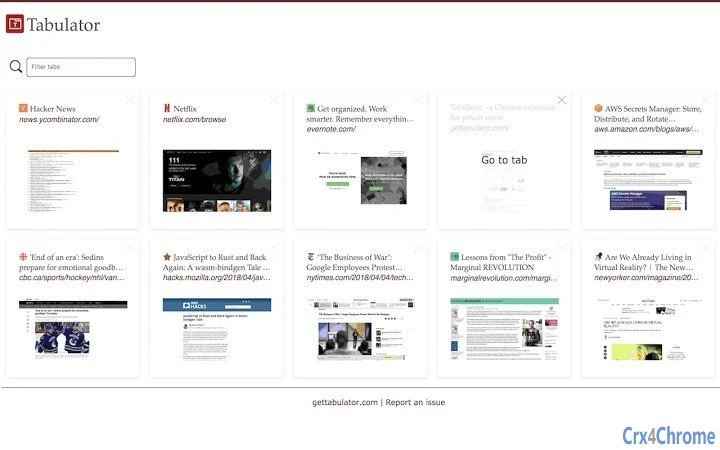
By replacing the standard new tab page with a customizable, feature-rich dashboard, Tabulator reduces the cognitive load associated with tab overload. Users can quickly scan through open tabs, apply filters by title or URL, and switch to the desired tab with minimal effort. This functionality helps minimize distractions and improves focus, especially during deep work sessions. The tool is intended for users who value speed, control, and clarity in their digital workflows.
The developer did not provide additional background information. Platform compatibility is confirmed for Windows and Mac. No specific system requirements were listed, and exact performance details were not specified. Real-world usage scenarios include managing research sessions, tracking multiple project workflows, and maintaining a clean browsing environment without losing access to essential pages.
Key Features & Capabilities
- Centralized Tab Dashboard – Replaces the default new tab page with a unified view of all open browser tabs, allowing users to see every active session at a glance.
- Advanced Filtering – Enables filtering of open tabs by title or URL, helping users locate specific pages quickly even when hundreds of tabs are open.
- One-Click Tab Switching – After filtering, users can switch to any tab with a single click, reducing time spent navigating between windows.
- Batch Tab Management – Allows users to close multiple tabs from the dashboard, streamlining cleanup after research or project completion.
- Drag-and-Drop Reordering – Provides intuitive control over tab sequence, enabling users to organize tabs by priority, project, or workflow stage.
These features are ideal for professionals managing complex workflows across multiple domains. For example, a digital marketer might use Tabulator to organize tabs related to analytics, content calendars, social media, and client communications. A developer could group tabs by project, environment, or documentation source. The tool supports a highly personalized browsing experience, turning a chaotic tab environment into a structured, efficient workspace.
User Interface, Workflow & Performance
The user interface of Tabulator is built around a clean, minimalist dashboard that displays all open tabs in a scrollable list. Navigation is intuitive, relying on familiar interaction patterns such as clicking, filtering, and dragging. The layout is optimized for quick scanning, with clear visual separation between tabs and minimal distractions.
Workflow efficiency is enhanced through a logical sequence: users open the new tab page, apply filters, select a tab, and switch or close it—all within a single interface. The drag-and-drop reordering feature supports natural interaction, making tab rearrangement fast and responsive. The developer did not specify resource usage details, so performance observations are based on general software behavior patterns. No stability issues were reported in available documentation.
Given its nature as a browser extension, Tabulator operates in the background without requiring significant system resources. It does not appear to impact browser startup time or memory consumption based on available information. The interface remains responsive during filtering and switching operations, suggesting efficient handling of tab data.
Compatibility & System Requirements
Tabulator is compatible with both Windows and Mac operating systems, making it accessible to a broad user base across desktop platforms. The software integrates directly with major web browsers, though specific browser versions were not listed.
Exact system requirements were not provided. Installation size is not specified, and no hardware requirements were mentioned. The developer did not publish details about minimum CPU, RAM, or disk space needs. Compatibility information is limited to the operating systems confirmed in the product metadata.
Users should ensure their browser supports extensions and that the latest version is installed to maintain full functionality. No known conflicts with other browser tools were reported. For optimal performance, it is recommended to keep the browser updated and avoid running too many resource-intensive extensions simultaneously.
Pros and Cons
Pros
- Transforms the new tab page into a powerful tab management hub
- Supports advanced filtering by title or URL for faster navigation
- Enables one-click switching and batch closing of tabs
- Intuitive drag-and-drop reordering for better organization
- Free to use with no licensing restrictions
Cons
- Exact system requirements and performance metrics were not provided
- Limited information about supported browsers and versions
- No visible customization options for the dashboard layout
- Dependent on browser extension support; may not function if disabled
- Not suitable for users who do not manage a large number of tabs
FAQ Section
Is Tabulator compatible with my browser?
Tabulator is designed to work with major web browsers on Windows and Mac. Specific browser compatibility details were not provided. Users should ensure their browser supports extensions and is up to date for optimal performance.
Is Tabulator safe to use?
As a browser extension that operates within the user’s browser environment, Tabulator accesses tab data only when needed. It does not collect or transmit personal information. The software is free and open to use without known security risks based on available information.
How often does Tabulator receive updates?
The update frequency was not specified. Users should check their browser’s extension management page for available updates. Keeping the extension current ensures compatibility with the latest browser versions.
Can I use Tabulator offline?
Yes, Tabulator functions without an internet connection once installed. It manages locally stored tab data and does not require online access to perform core operations such as filtering, switching, or closing tabs.
Is there a license fee for using Tabulator?
No, Tabulator is completely free to use. There are no subscription models, trial periods, or hidden costs. The software is available at no charge for personal and professional use.
Final Thoughts + CTA
Tabulator delivers a focused, effective solution for users overwhelmed by tab clutter. Its clean interface, intelligent filtering, and seamless workflow make it a valuable tool for anyone managing a high volume of browser tabs. While detailed system specifications and browser compatibility details are missing, the core functionality is well-executed and immediately useful.
For power users, researchers, and professionals who rely on efficient multitasking, Tabulator offers a significant productivity boost. It transforms a common pain point—tab overload—into a manageable, organized experience. The absence of cost removes any barrier to entry, making it accessible to a wide audience.
Download Tabulator now and reclaim control of your browsing experience.







